(Vietnamese) ATBMHTTT CN04 | PTIT-Security-Lab | [Deploying and Testing an IDS/IPS System]
Triển khai và thử nghiệm hệ thống IDS/IPS nhằm giám sát lưu lượng mạng, phát hiện các hành vi bất thường và cảnh báo hoặc ngăn chặn những cuộc tấn công có thể xảy ra. Đề tài sử dụng các công cụ như Snort hoặc Suricata để cấu hình hệ thống, tạo các tình huống tấn công thử nghiệm trên môi trường máy ảo, sau đó phân tích log, cảnh báo và đánh giá hiệu quả phát hiện, phòng chống xâm nhập của hệ thống.

Topic Overview
1
2
3
4
5
6
7
Đề tài 10: Triển khai và thử nghiệm hệ thống IDS/IPS
Mục tiêu: Sử dụng Snort hoặc Suricata để phát hiện tấn công trên hệ thống mạng.
Môi trường: 2 máy ảo:
| Máy ảo          | Vai trò       | Chức năng                                     |
| --------------- | ------------- | --------------------------------------------- |
| **Kali Linux**  | Máy tấn công  | Thực hiện scan, dò cổng, thử tấn công         |
| **Kali Purple** | Máy phòng thủ | Cài IDS/IPS để giám sát và phát hiện tấn công |
Deployment Model
1
2
Kali Linux  ───────────►  Kali Purple
 Attacker                  IDS/IPS Sensor
1
2
3
4
5
6
7
8
9
10
11
12
13
14
15
16
17
18
19
20
21
22
23
24
25
26
27
28
29
30
31
32
33
┌──────────────────────────────┐
│        Máy 1: Kali Linux     │
│          Attacker            |
│                              │
│ Công cụ tấn công:            │
│ - ping                       │
│ - nmap                       │
│ - hydra                      │
│ - nikto                      │
│ - curl                       │
│ - hping3                     │
└───────────────┬──────────────┘
                │
                │ Scan / Attack Traffic
                ▼
┌──────────────────────────────────────────────┐
│            Máy 2: Kali Purple                │
│      Defender + Victim + IDS/IPS Server      │
│                                              │
│ Dịch vụ bị tấn công:                         │
│ - SSH Server                                 │
│ - Apache Web Server                          │
│ - DVWA / Web test                            │
│                                              │
│ Công cụ IDS/IPS:                             │
│ - Suricata IDS/IPS                           │
│ - Snort IDS/IPS                              │
│                                              │
│ Log giám sát:                                │
│ - /var/log/suricata/fast.log                 │
│ - /var/log/suricata/eve.json                 │
│ - /var/log/snort/alert                       │
└──────────────────────────────────────────────┘
Trong đó:
- Kali Linux dùng để giả lập hacker.
- Kali Purple dùng để cài Suricata/Snort.
- Khi Kali Linux quét cổng, ping, thử tấn công SSH/HTTP…, Kali Purple sẽ ghi log cảnh báo.
Network Configuration for 2 Virtual Machines
Trong VMware đặt cả 2 máy về cùng một kiểu mạng
1
2
3
Network Adapter: Host-only Adapter
Hoặc
Network Adapter: NAT Network
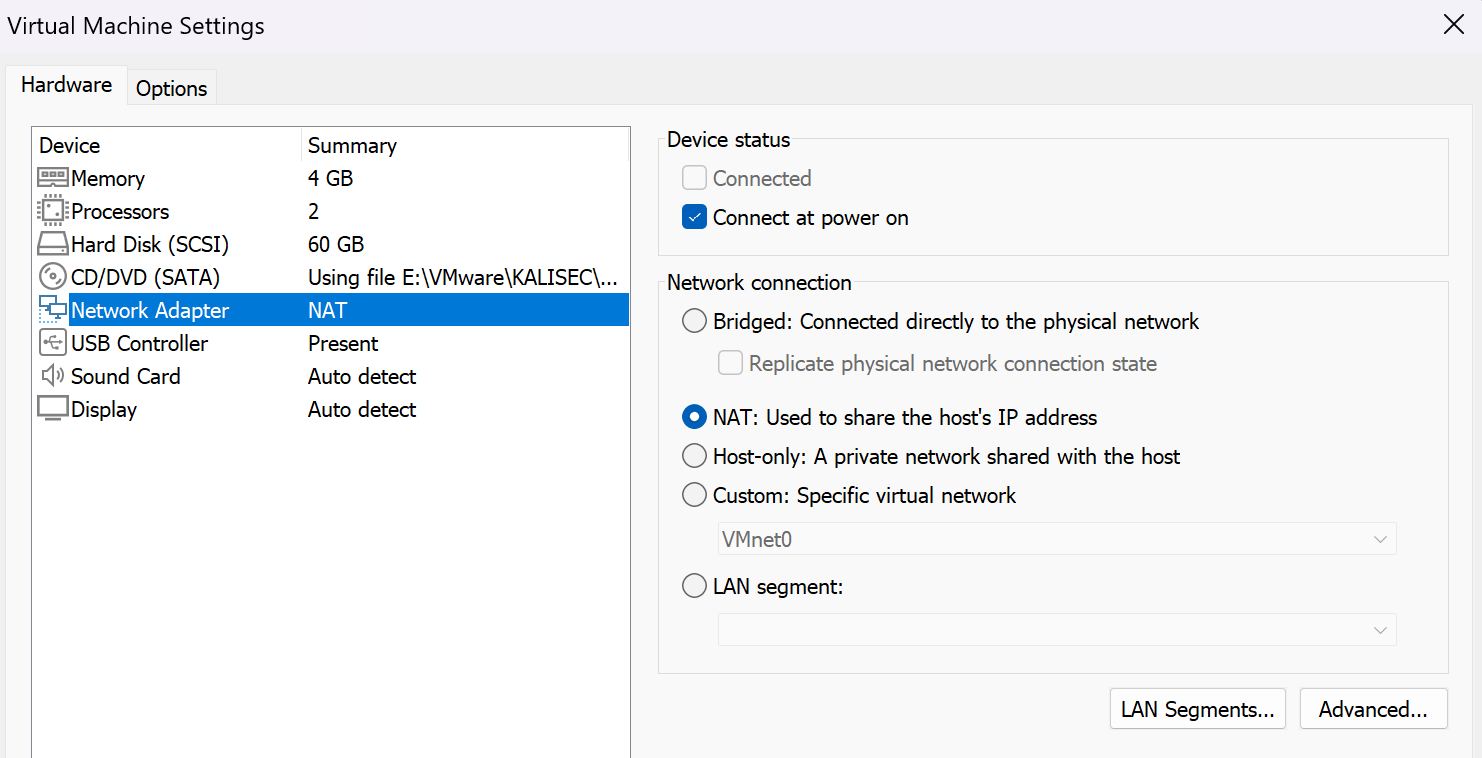
Kiểm tra IP trên từng máy:
VM KaliLinux
1
2
3
4
5
6
7
8
9
10
11
12
13
14
┌──(kali㉿kali)-[~]
└─$ ip a
1: lo: <LOOPBACK,UP,LOWER_UP> mtu 65536 qdisc noqueue state UNKNOWN group default qlen 1000
    link/loopback 00:00:00:00:00:00 brd 00:00:00:00:00:00
    inet 127.0.0.1/8 scope host lo
       valid_lft forever preferred_lft forever
    inet6 ::1/128 scope host noprefixroute
       valid_lft forever preferred_lft forever
2: eth0: <BROADCAST,MULTICAST,UP,LOWER_UP> mtu 1500 qdisc fq_codel state UP group default qlen 1000
    link/ether 00:0c:29:a2:dc:51 brd ff:ff:ff:ff:ff:ff
    inet 192.168.174.129/24 brd 192.168.174.255 scope global dynamic noprefixroute eth0
       valid_lft 1692sec preferred_lft 1692sec
    inet6 fe80::20c:29ff:fea2:dc51/64 scope link noprefixroute
       valid_lft forever preferred_lft forever
VM KaliPurple
1
2
3
4
5
6
7
8
9
10
11
12
13
14
┌──(kali㉿kali)-[~]
└─$ ip a
1: lo: <LOOPBACK,UP,LOWER_UP> mtu 65536 qdisc noqueue state UNKNOWN group default qlen 1000
    link/loopback 00:00:00:00:00:00 brd 00:00:00:00:00:00
    inet 127.0.0.1/8 scope host lo
       valid_lft forever preferred_lft forever
    inet6 ::1/128 scope host noprefixroute
       valid_lft forever preferred_lft forever
2: eth0: <BROADCAST,MULTICAST,UP,LOWER_UP> mtu 1500 qdisc fq_codel state UP group default qlen 1000
    link/ether 00:0c:29:a6:b8:a5 brd ff:ff:ff:ff:ff:ff
    inet 192.168.174.130/24 brd 192.168.174.255 scope global dynamic noprefixroute eth0
       valid_lft 940sec preferred_lft 940sec
    inet6 fe80::20c:29ff:fea6:b8a5/64 scope link noprefixroute
       valid_lft forever preferred_lft forever
1
2
Kali Linux:   192.168.174.129
Kali Purple:  192.168.174.130
Kiểm tra kết nối:
Từ Kali Linux ping sang Kali Purple: 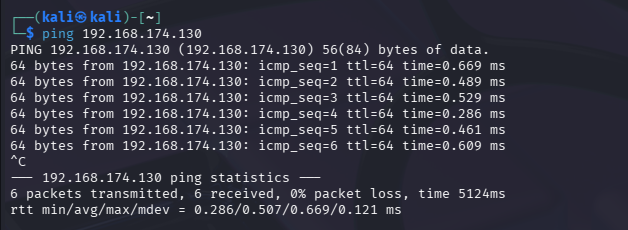
Từ Kali Purple ping sang Kali Linux: 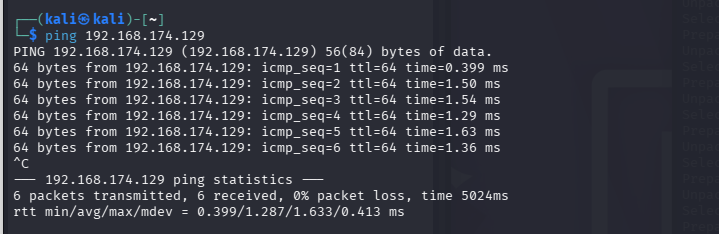
Select the IDS/IPS tool
Suricata có thể phát hiện:
Ping scan Port scan bằng Nmap Brute force SSH Truy cập web bất thường Một số mẫu tấn công đơn giản Gói tin đáng ngờ trong mạng
Snort có thể phát hiện:
Ping scan Port scan bằng Nmap Dò quét dịch vụ SSH, HTTP, FTP Brute force SSH Tấn công web cơ bản Gói tin bất thường trong mạng Lưu lượng có dấu hiệu khai thác lỗ hổng Các mẫu tấn công dựa trên rule
Install Snort/Suricata on Kali Purple
Trên máy Kali Purple, chạy: Cài công cụ suricate/snort
1
2
3
sudo apt update
sudo apt install suricata -y   # Để cài đặt suricata
sudo apt install snort -y      # Để cài đặt snort
Kiểm tra phiên bản:
1
2
3
4
5
6
7
8
9
10
11
12
13
14
15
16
17
18
19
20
21
22
23
24
25
26
27
28
29
30
31
32
33
34
35
36
37
38
39
40
41
42
43
44
45
46
47
48
49
50
51
52
53
54
55
56
57
58
59
60
61
62
63
64
65
66
67
68
69
70
71
72
73
74
75
76
77
78
79
80
81
82
83
84
85
86
87
88
89
90
91
92
93
94
95
96
┌──(kali㉿kali)-[~]
└─$ suricata --build-info
This is Suricata version 8.0.4 RELEASE
Features: NFQ PCAP_SET_BUFF AF_PACKET HAVE_PACKET_FANOUT LIBCAP_NG LIBNET1.1 HAVE_HTP_URI_NORMALIZE_HOOK PCRE_JIT HAVE_NSS HTTP2_DECOMPRESSION HAVE_LUA HAVE_JA3 HAVE_JA4 HAVE_LIBJANSSON TLS TLS_C11 MAGIC RUST POPCNT64
SIMD support: SSE_4_2 SSE_4_1 SSE_3 SSE_2
Atomic intrinsics: 1 2 4 8 16 byte(s)
64-bits, Little-endian architecture
GCC version 15.2.0, C version 201112
compiled with _FORTIFY_SOURCE=2
L1 cache line size (CLS)=64
thread local storage method: _Thread_local
compiled with LibHTP v8.0.4

Suricata Configuration:
  AF_PACKET support:                       yes
  AF_XDP support:                          yes
  DPDK support:                            yes
  eBPF support:                            yes
  XDP support:                             yes
  PF_RING support:                         no
  NFQueue support:                         yes
  NFLOG support:                           yes
  IPFW support:                            no
  Netmap support:                          no
  DAG enabled:                             no
  Napatech enabled:                        no
  WinDivert enabled:                       no
  Npcap support:

  Unix socket enabled:                     yes
  Detection enabled:                       yes

  Libmagic support:                        yes
  libjansson support:                      yes
  hiredis support:                         yes
  hiredis async with libevent:             yes
  PCRE jit:                                yes
  GeoIP2 support:                          yes
  JA3 support:                             yes
  JA4 support:                             yes
  Hyperscan support:                       yes
  Hwloc support:                           yes
  Libnet support:                          yes
  liblz4 support:                          yes
  Landlock support:                        yes
  Systemd support:                         yes

  Rust strict mode:                        no
  Rust compiler path:                      /usr/bin/rustc
  Rust compiler version:                   rustc 1.92.0 (ded5c06cf 2025-12-08) (built from a source tarball)
  Cargo path:                              /usr/bin/cargo
  Cargo version:                           cargo 1.92.0 (344c4567c 2025-10-21) (built from a source tarball)

  Python support:                          yes
  Python path:                             /usr/bin/python3
  Install suricatactl:                     yes
  Install suricatasc:                      yes
  Install suricata-update:                 no, not bundled

  Profiling enabled:                       no
  Profiling locks enabled:                 no
  Profiling rules enabled:                 no

  Plugin support (experimental):           yes
  DPDK Bond PMD:                           yes

Plugins:
  nDPI:                                    no

Development settings:
  Coccinelle / spatch:                     no
  Unit tests enabled:                      no
  Debug output enabled:                    no
  Debug validation enabled:                no
  QA-simulation enabled:
  Fuzz targets enabled:                    no

Generic build parameters:
  Installation prefix:                     /usr
  Configuration directory:                 /etc/suricata/
  Log directory:                           /var/log/suricata/

  --prefix                                 /usr
  --sysconfdir                             /etc
  --localstatedir                          /var
  --datarootdir                            /usr/share

  Host:                                    x86_64-pc-linux-gnu
  Compiler:                                gcc (exec name) / g++ (real)
  GCC Protect enabled:                     yes
  GCC march native enabled:                no
  GCC Profile enabled:                     no
  Position Independent Executable enabled: no
  CFLAGS                                   -g -O2 -Werror=implicit-function-declaration -ffile-prefix-map=/build/reproducible-path/suricata-8.0.4=. -fstack-protector-strong -fstack-clash-protection -Wformat -Werror=format-security -fcf-protection -fPIC -DOS_LINUX -std=c11  -I/usr/include/dpdk -I/usr/include/dpdk/../x86_64-linux-gnu/dpdk -include rte_config.h -march=corei7 -mrtm -I/usr/include/x86_64-linux-gnu -I/usr/include/libnl3 -I/usr/include/dbus-1.0 -I/usr/lib/x86_64-linux-gnu/dbus-1.0/include
  PCAP_CFLAGS                              -I/usr/include/dbus-1.0 -I/usr/lib/x86_64-linux-gnu/dbus-1.0/include
  SECCFLAGS                                -fstack-protector -D_FORTIFY_SOURCE=2 -Wformat -Wformat-security
1
2
3
4
5
6
7
8
9
10
11
12
13
14
15
16
┌──(kali㉿kali)-[~]
└─$ snort -V

   ,,_     -*> Snort++ <*-
  o"  )~   Version 3.12.1.0
   ''''    By Martin Roesch & The Snort Team
           http://snort.org/contact#team
           Copyright (C) 2014-2026 Cisco and/or its affiliates. All rights reserved.
           Copyright (C) 1998-2013 Sourcefire, Inc., et al.
           Using DAQ version 3.0.24
           Using libpcap version 1.10.6 (64-bit time_t, with TPACKET_V3)
           Using LuaJIT version 2.1.1761786044
           Using LZMA version 5.8.3
           Using OpenSSL 3.6.1 27 Jan 2026
           Using PCRE2 version 10.46 2025-08-27
           Using ZLIB version 1.3.1
Cài SSH Server:
1
2
3
sudo apt install openssh-server -y
sudo systemctl enable ssh
sudo systemctl start ssh
Kiểm tra phiên bản: 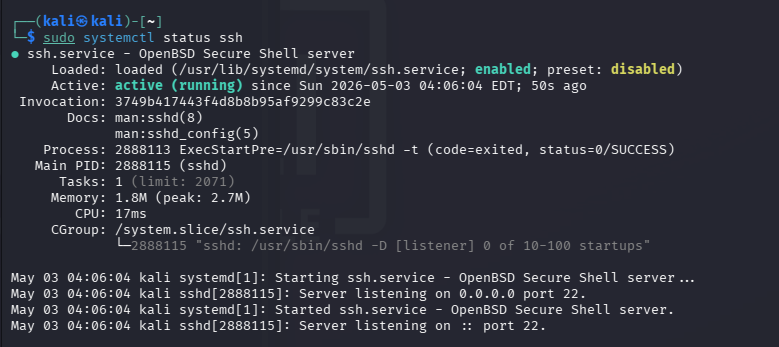
Cài Apache Web Server:
1
2
3
sudo apt install apache2 -y
sudo systemctl enable apache2
sudo systemctl start apache2
Kiểm tra từ Kali Linux: 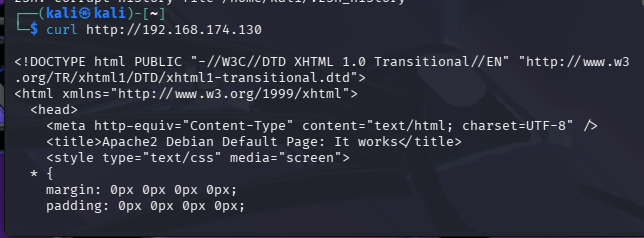
Chạy Suricata trên card mạng eth0: 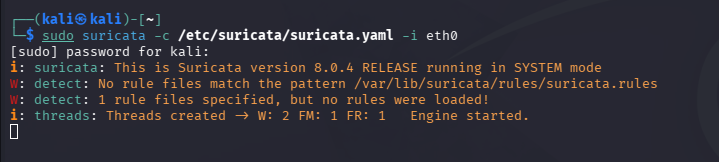
Xem log Suricata:
Kiểm Tra cấu hình Snort: 
1
2
3
4
5
6
7
8
9
10
11
12
13
14
15
16
17
18
19
20
21
22
23
24
25
26
27
28
29
30
31
32
33
34
35
36
37
38
39
40
41
42
43
44
45
46
47
48
49
50
51
52
53
54
55
56
57
58
59
60
61
62
63
64
65
66
67
68
69
70
71
72
73
74
75
76
77
78
79
80
81
82
83
84
85
86
87
88
89
90
91
92
93
94
95
96
97
98
99
100
101
102
┌──(kali㉿kali)-[~]
└─$ sudo snort -c /etc/snort/snort.lua -T
[sudo] password for kali:
--------------------------------------------------
o")~   Snort++ 3.12.1.0
--------------------------------------------------
Loading /etc/snort/snort.lua:
Loading snort_defaults.lua:
Finished snort_defaults.lua:
        ips
        file_inspect
        classifications
        binder
        wizard
        appid
        file_policy
        process
        ftp_client
        ftp_server
        modbus
        iec104
        sip
        back_orifice
        stream_file
        output
        stream
        active
        alerts
        daq
        decode
        host_cache
        host_tracker
        hosts
        network
        packets
        search_engine
        stream_udp
        stream_icmp
        stream_ip
        stream_tcp
        stream_user
        arp_spoof
        dns
        imap
        netflow
        normalizer
        pop
        rpc_decode
        socks
        ssh
        ssl
        telnet
        cip
        dnp3
        mms
        opcua
        s7commplus
        dce_smb
        dce_tcp
        dce_udp
        dce_http_proxy
        dce_http_server
        gtp_inspect
        port_scan
        smtp
        ftp_data
        http_inspect
        http2_inspect
        js_norm
        references
Finished /etc/snort/snort.lua:
Loading file_inspect.rules_file:
Loading file_magic.rules:
Finished file_magic.rules:
Finished file_inspect.rules_file:
--------------------------------------------------
ips policies rule stats
              id  loaded  shared enabled    file
               1     219       0     219    /etc/snort/snort.lua
--------------------------------------------------
rule counts
       total rules loaded: 219
               text rules: 219
            option chains: 219
            chain headers: 1
--------------------------------------------------
service rule counts          to-srv  to-cli
                  file_id:      219     219
                    total:      219     219
--------------------------------------------------
fast pattern groups
                to_server: 1
                to_client: 1
--------------------------------------------------
search engine (ac_bnfa)
appid: MaxRss diff: 2688
appid: patterns loaded: 300
--------------------------------------------------
pcap DAQ configured to passive.

Snort successfully validated the configuration (with 0 warnings).
o")~   Snort exiting
Chạy Snort IDS trên card eth0:
1
2
3
4
5
6
7
8
9
10
11
12
13
14
15
16
17
18
19
20
21
22
23
24
25
26
27
28
29
30
31
32
33
34
35
36
37
38
39
40
41
42
43
44
┌──(kali㉿kali)-[~]
└─$ sudo snort -c /etc/snort/snort.lua -i eth0 -A alert_fast
Finished /etc/snort/snort.lua:
Loading file_inspect.rules_file:
Loading file_magic.rules:
Finished file_magic.rules:
Finished file_inspect.rules_file:
--------------------------------------------------
ips policies rule stats
              id  loaded  shared enabled    file
               1     219       0     219    /etc/snort/snort.lua
--------------------------------------------------
rule counts
       total rules loaded: 219
               text rules: 219
            option chains: 219
            chain headers: 1
--------------------------------------------------
service rule counts          to-srv  to-cli
                  file_id:      219     219
                    total:      219     219
--------------------------------------------------
fast pattern groups
                to_server: 1
                to_client: 1
--------------------------------------------------
search engine (ac_bnfa)
                instances: 2
                 patterns: 438
            pattern chars: 2602
               num states: 1832
         num match states: 392
             memory scale: KB
             total memory: 71.2812
           pattern memory: 19.6484
        match list memory: 28.4375
        transition memory: 22.9453
appid: MaxRss diff: 2816
appid: patterns loaded: 300
--------------------------------------------------
pcap DAQ configured to passive.
Commencing packet processing
Retry queue interval is: 200 ms
++ [0] eth0
Add the Suricata rule
1
sudo nano /etc/suricata/rules/local.rules
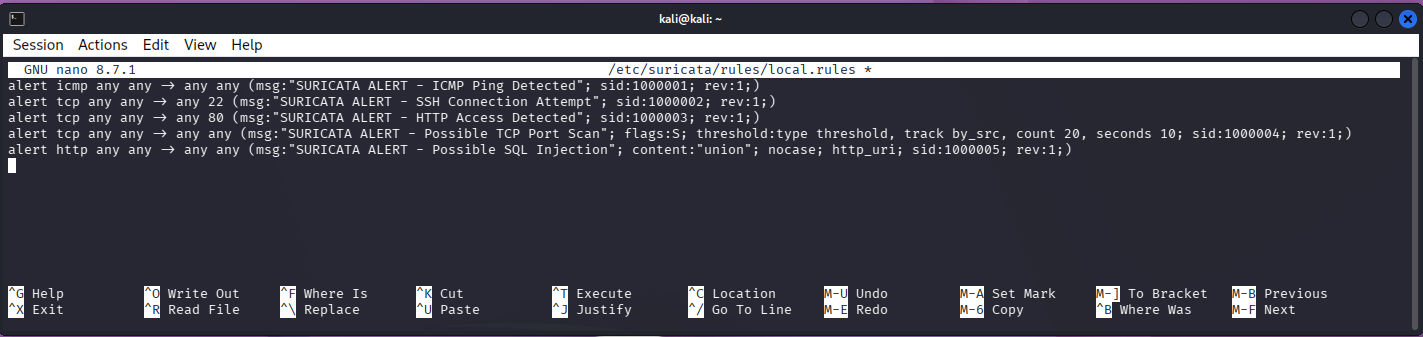 Kiểm tra cấu hình:
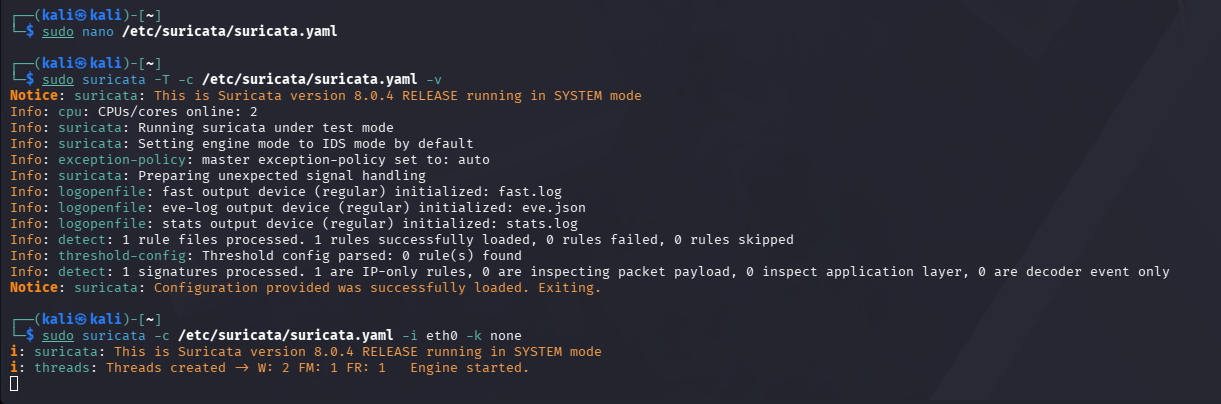
Attack scenarios from Kali Linux
Kịch bản 1: Ping ICMP 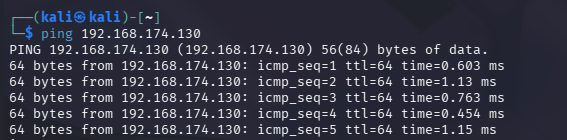 Kết quả mong đợi:
Kịch bản 2: