(English) Fetch The Flag 2026 | Write-up - Voidstep [Forensics]
My write-up for the Fetch The Flag 2026 easy forensics challenge Voidstep, where I analyzed a PCAP in Wireshark, identified decoy-host reconnaissance and the real attacker IP, traced enumeration and file-read abuse, and reconstructed the attack timeline.
Scenario
You’re a SOC analyst at Sfax-Tech. Your team lead rushes in: “A client server triggered multiple alerts. The system isolated it and saved the traffic.” She hands you a USB with a PCAP file. Find out what happened. Time is critical.
Skills Required
- Basic network protocol analysis with Wireshark (TCP, HTTP, and IP conversations).
- Ability to use display filters to isolate attacker and target traffic.
- Understanding of common recon and brute-force patterns (Nmap, Gobuster, and login attempts).
- Familiarity with web request/response structure and suspicious parameters.
- Basic timeline reconstruction from packet timestamps.
Skills Learned
- How decoy scanning patterns can still expose the real attacker through traffic correlation.
- How to confirm open ports from SYN and SYN-ACK behavior in packet captures.
- How to identify web enumeration tools directly from HTTP headers.
- How to trace file-read abuse and credential-targeting attempts in PCAP data.
- How to solve forensics CTF questions methodically from one capture file.
Artifacts Provided
File: Net-Traffic.PCAP
SHA256 Hash: 3f57bbe369f78c92d79b22c31c6c7d93d30fabf8d95409c28d6db98828d06bb1
Initial Analysis
To begin the analysis, the password-protected ZIP file was unlocked using the password hacktheblue
Questions & Answers
| Question | Answer |
|---|---|
| Q1: How many decoy hosts are randomized in this reconnaissance evasion technique? | 11 |
| Q2: What is the real attacker IP address? | 192.168.1.23 |
| Q3: How many open ports did the attacker find? | 4 |
| Q4: What web enumeration tool did the attacker use? | gobuster |
| Q5: What is the first endpoint discovered by the attacker? | /about |
| Q6: What was the first file extension tested during the enumeration? | html |
| Q7: What is the full vulnerable request parameter used in the attack? | file |
| Q8: What is the username discovered by the attacker? | zoro |
| Q9: What authentication-related file did the attacker try to access, enter the full path? | /home/zoro/.ssh/authorized_keys |
| Q10: When were the first brute force attempts occurred by the attacker to get the right password? | 09:02:47,19 |
Detailed Writeup
Q1: Decoy Hosts Detection
Wireshark Filter Used:
1
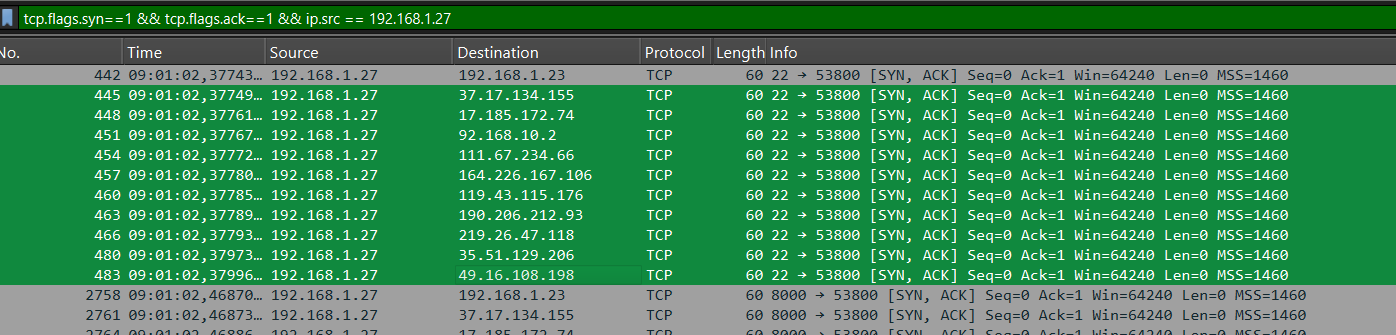
tcp.flags.syn==1 && tcp.flags.ack==1 && ip.src == 192.168.1.27
This filter shows SYN-ACK packets from the target host 192.168.1.27.
Analysis:
- 11 decoy hosts were identified
- All packets share the same timestamp (09:01:02)
- Same source (192.168.1.27) contacts many different destination IPs
Evidence:
Destinations identified: 192.168.1.23, 37.17.134.155, 17.185.172.74, 92.168.10.2, 111.67.234.66, 164.226.167.106, 119.43.115.176, 190.206.212.93, 219.26.47.118, 35.51.129.206, 49.16.108.198
Conclusion:
This is likely a decoy scan using nmap --randomize-hosts -D RND:10. The attacker hides the real scan by mixing many fake targets.
Answer: 11
Q2: Real Attacker IP Address
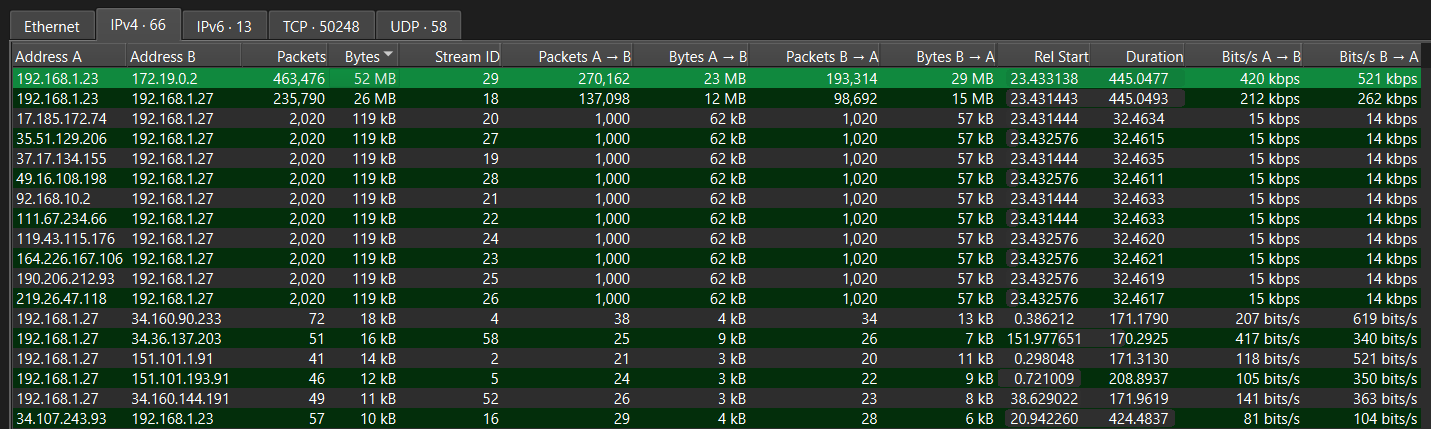
Navigate to: Statistics → Conversations → IPv4 tab
This shows all communication pairs between IP addresses with traffic statistics.
Traffic Volume Analysis:
192.168.1.23↔192.168.1.27: 235,790 packets, 26 MB192.168.1.23↔172.19.0.2: 463,476 packets, 52 MB
Key Observation:
This IP address (192.168.1.23) shows massive traffic volume and is also included in the decoy scan from Question 1.
Answer: 192.168.1.23
Q3: Open Ports Discovery
Wireshark Filter Used:
1
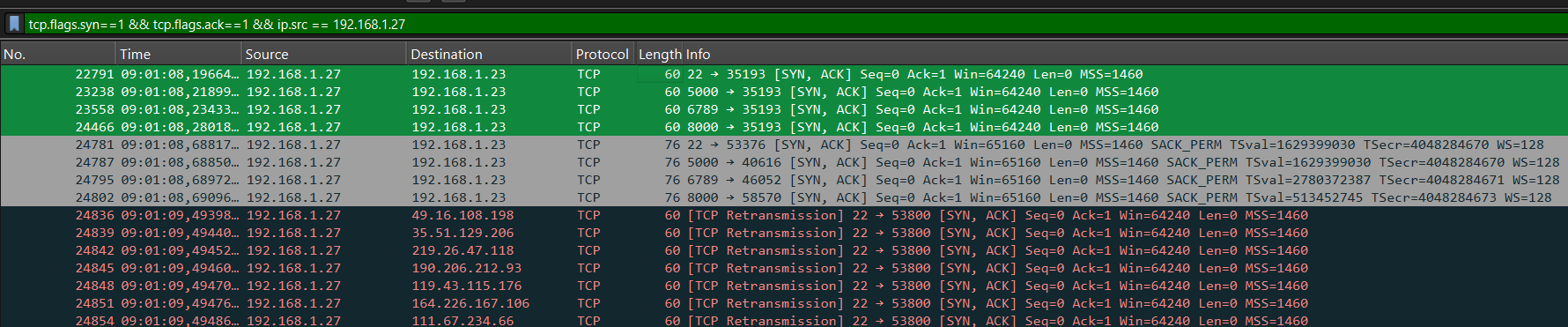
tcp.flags.syn==1 && tcp.flags.ack==1 && ip.src == 192.168.1.27
TCP Handshake Analysis:
- The attacker sends SYN packets to initiate a TCP handshake
- If a port is open, the target responds with a SYN-ACK packet
Open Ports Found:
- Port 22 (SSH)
- Port 5000
- Port 6789
- Port 8000
Answer: 4
Q4: Web Enumeration Tool
Wireshark Filter Used:
1
http.request && ip.src == 192.168.1.23
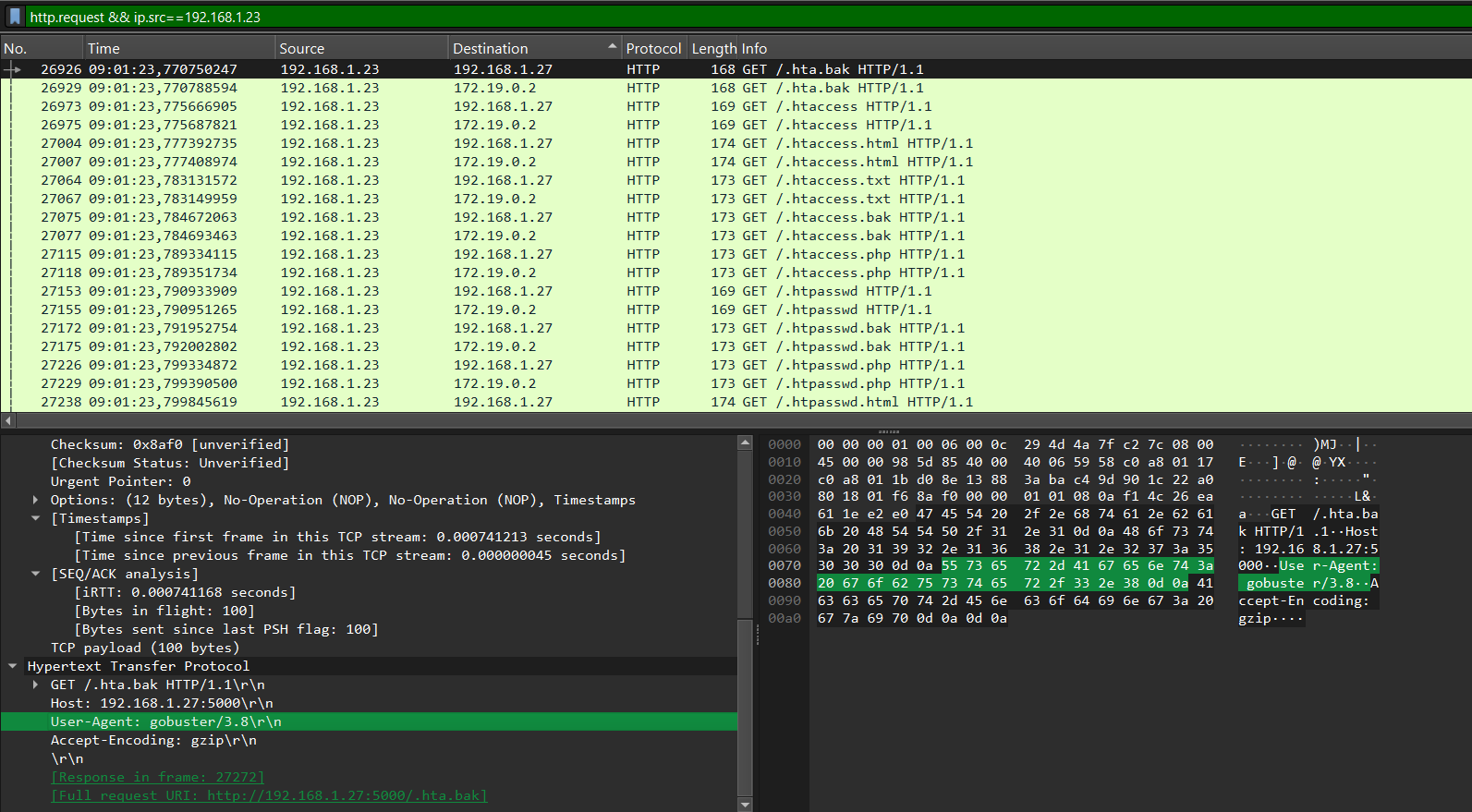
User-Agent String:
1
User-Agent: gobuster/3.8
The User-Agent string is clearly visible in the HTTP request headers.
Answer: gobuster
Q5: First Endpoint Discovered
Wireshark Filter Used:
1
http.response.code == 200
This filter shows all HTTP responses with status code 200 (OK), indicating successful requests to existing endpoints.
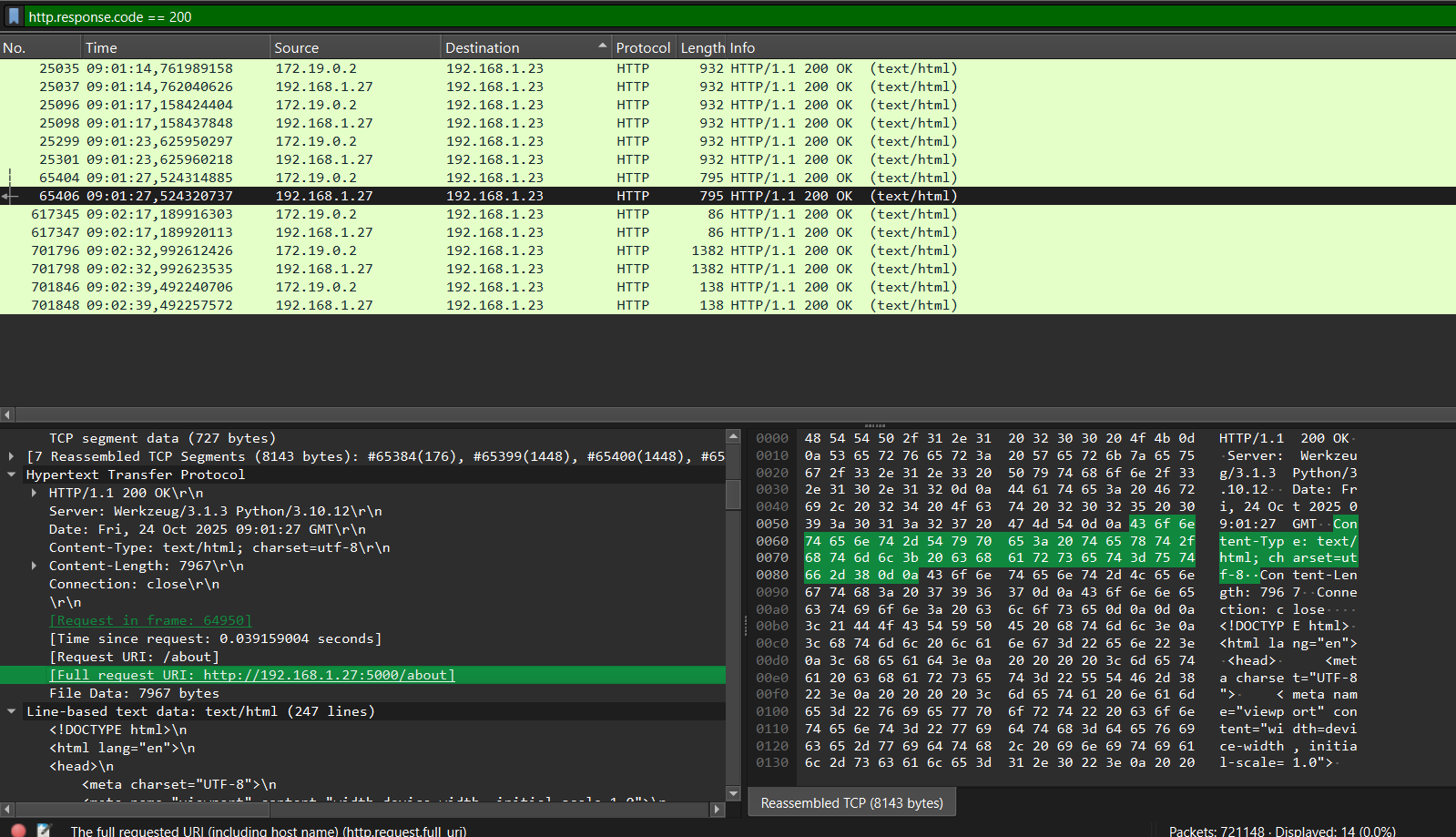
Request Details:
- Request URI:
/about - Full request URI:
http://192.168.1.27:5000/about - Timestamp: 09:01:27
Timeline Analysis:
Looking at the timestamps, /about appears at 09:01:27 and was the first endpoint discovered.
Answer: /about
Q6: First File Extension Tested
Wireshark Filter Used:
1
http.request && ip.src==192.168.1.23
This filter shows HTTP requests from the attacker’s source IP.
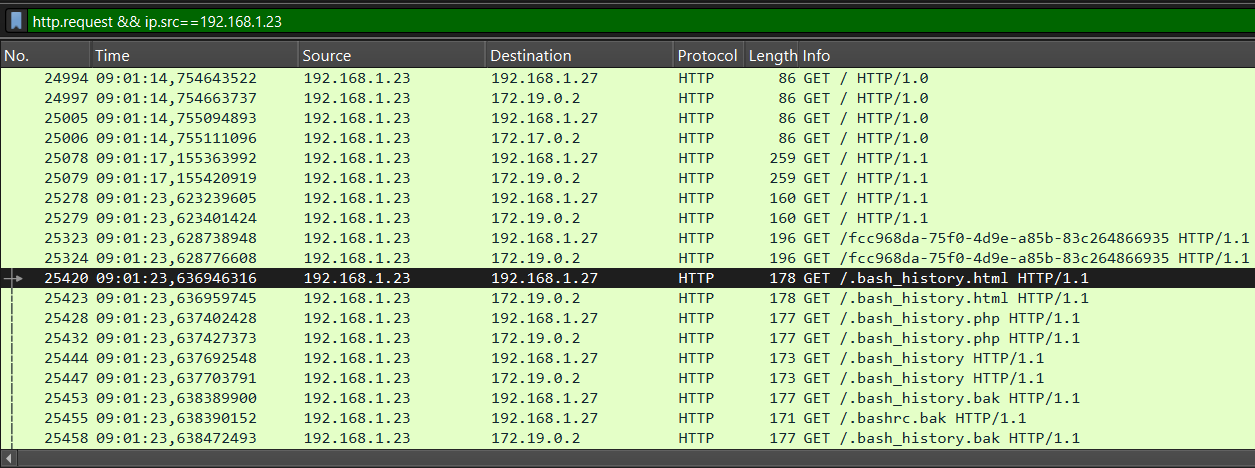
Evidence:
- Packet #25423 at 09:01:23:
GET /.bash_history.html
Timeline Analysis:
Looking at the earliest packets, the first file extension tested was html.
Answer: html
Q7: Vulnerable Request Parameter
Wireshark Filter Used:
1
http.request.uri contains "etc" && http.request.uri contains "passwd"
This filter shows HTTP requests containing both “etc” and “passwd” in the URI, indicating a Local File Inclusion (LFI) attack.
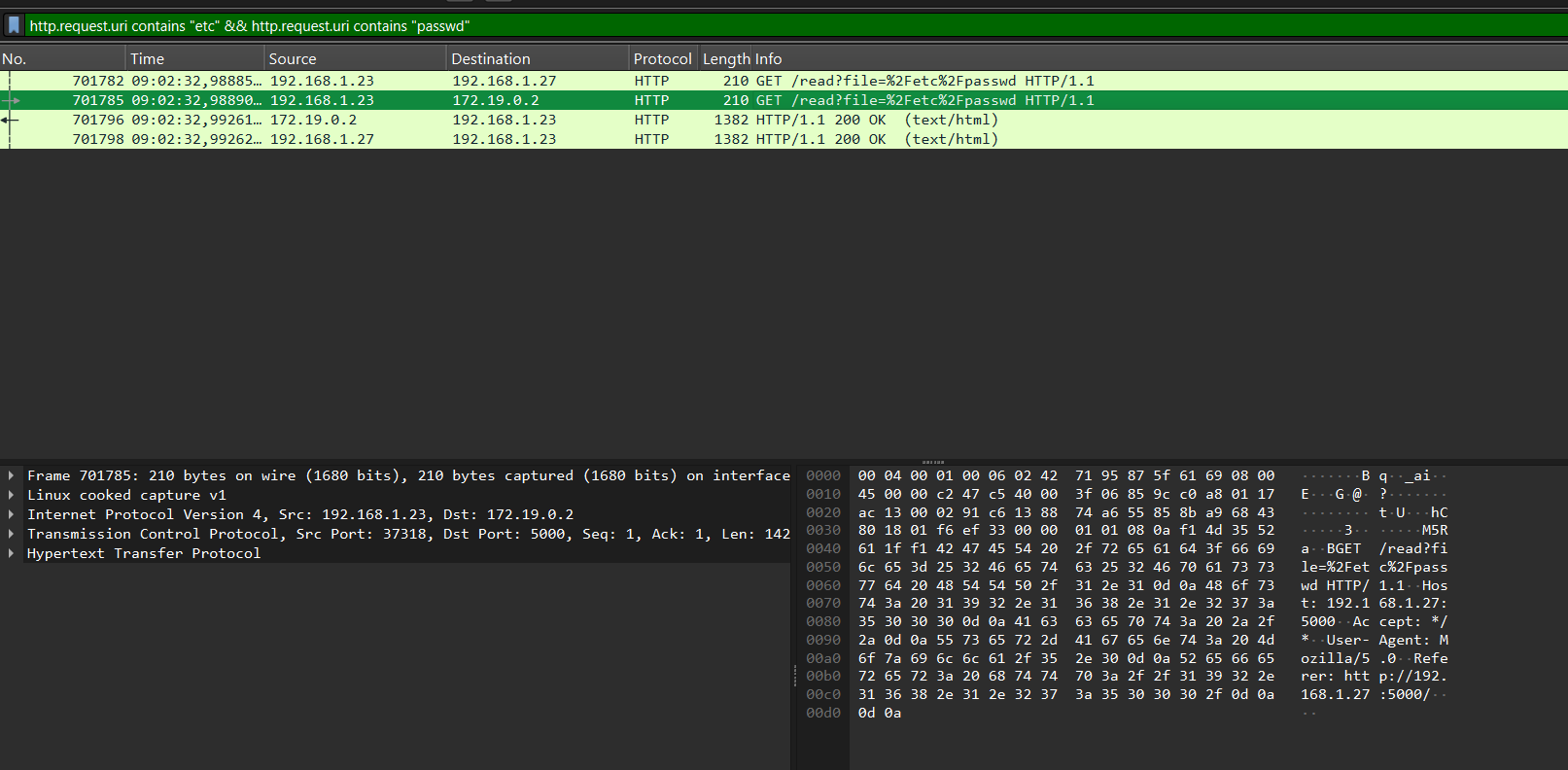
Full Vulnerable Request:
1
GET /read?file=%2Fetc%2Fpasswd HTTP/1.1
Parameter Identified: file
Answer: file
Q8: Username Discovery
Follow the HTTP stream of packet number 701782 and examine the /etc/passwd file contents.
1
2
3
4
5
6
7
8
9
10
11
12
13
14
15
16
17
18
19
20
21
22
23
24
25
26
27
28
29
30
31
32
33
34
35
36
37
38
GET /read?file=%2Fetc%2Fpasswd HTTP/1.1
Host: 192.168.1.27:5000
Accept: */*
User-Agent: Mozilla/5.0
Referer: http://192.168.1.27:5000/

HTTP/1.1 200 OK
Server: Werkzeug/3.1.3 Python/3.10.12
Date: Fri, 24 Oct 2025 09:02:32 GMT
Content-Type: text/html; charset=utf-8
Content-Length: 1314
Connection: close

root:x:0:0:root:/root:/bin/bash
daemon:x:1:1:daemon:/usr/sbin:/usr/sbin/nologin
bin:x:2:2:bin:/bin:/usr/sbin/nologin
sys:x:3:3:sys:/dev:/usr/sbin/nologin
sync:x:4:65534:sync:/bin:/bin/sync
games:x:5:60:games:/usr/games:/usr/sbin/nologin
man:x:6:12:man:/var/cache/man:/usr/sbin/nologin
lp:x:7:7:lp:/var/spool/lpd:/usr/sbin/nologin
mail:x:8:8:mail:/var/mail:/usr/sbin/nologin
news:x:9:9:news:/var/spool/news:/usr/sbin/nologin
uucp:x:10:10:uucp:/var/spool/uucp:/usr/sbin/nologin
proxy:x:13:13:proxy:/bin:/usr/sbin/nologin
www-data:x:33:33:www-data:/var/www:/usr/sbin/nologin
backup:x:34:34:backup:/var/backups:/usr/sbin/nologin
list:x:38:38:Mailing List Manager:/var/list:/usr/sbin/nologin
irc:x:39:39:ircd:/var/ircd:/usr/sbin/nologin
gnats:x:41:41:Gnats Bug-Reporting System (admin):/var/lib/gnats:/usr/sbin/nologin
nobody:x:65534:65534:nobody:/nonexistent:/usr/sbin/nologin
_apt:x:100:65534::/nonexistent:/usr/sbin/nologin
systemd-network:x:101:102:systemd Network Management:/:/usr/sbin/nologin
systemd-resolve:x:102:103:systemd Resolver:/:/usr/sbin/nologin
messagebus:x:103:105::/nonexistent:/usr/sbin/nologin
systemd-timesync:x:104:106:systemd Time Synchronization:/:/usr/sbin/nologin
sshd:x:105:65534::/run/sshd:/usr/sbin/nologin
zoro:x:1000:1000::/home/zoro:/bin/bash
User Entry Found:
1
zoro:x:1000:1000::/home/zoro:/bin/bash
User Details:
- Username:
zoro - UID: 1000 (typically the first regular user account)
- GID: 1000
- Home Directory:
/home/zoro - Shell:
/bin/bash(full shell access)
Answer: zoro
Q9: Authentication-Related File Access
Wireshark Filter Used:
1
http.response.code==200
This filter shows successful HTTP responses to identify what files the attacker attempted to access.
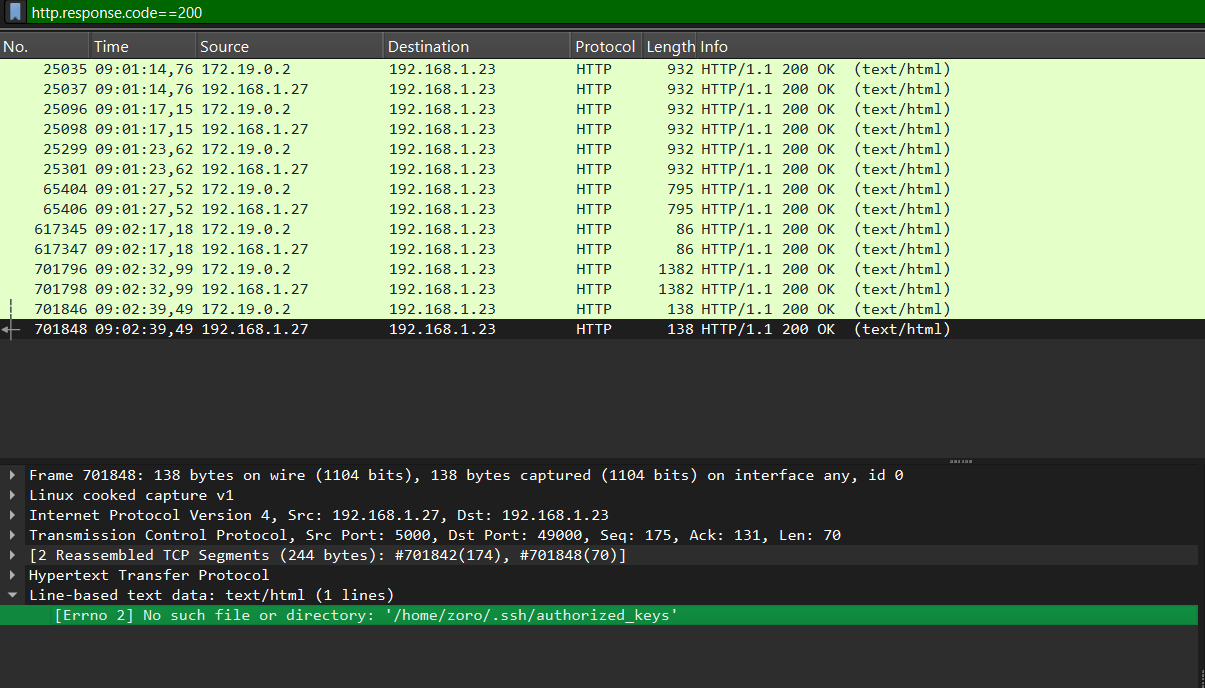
Authentication-Related File Accessed:
1
/home/zoro/.ssh/authorized_keys
Answer: /home/zoro/.ssh/authorized_keys
Q10: SSH Brute Force Timing
After retrieving the username during directory brute-force, the attacker immediately launched an SSH brute-force attack.
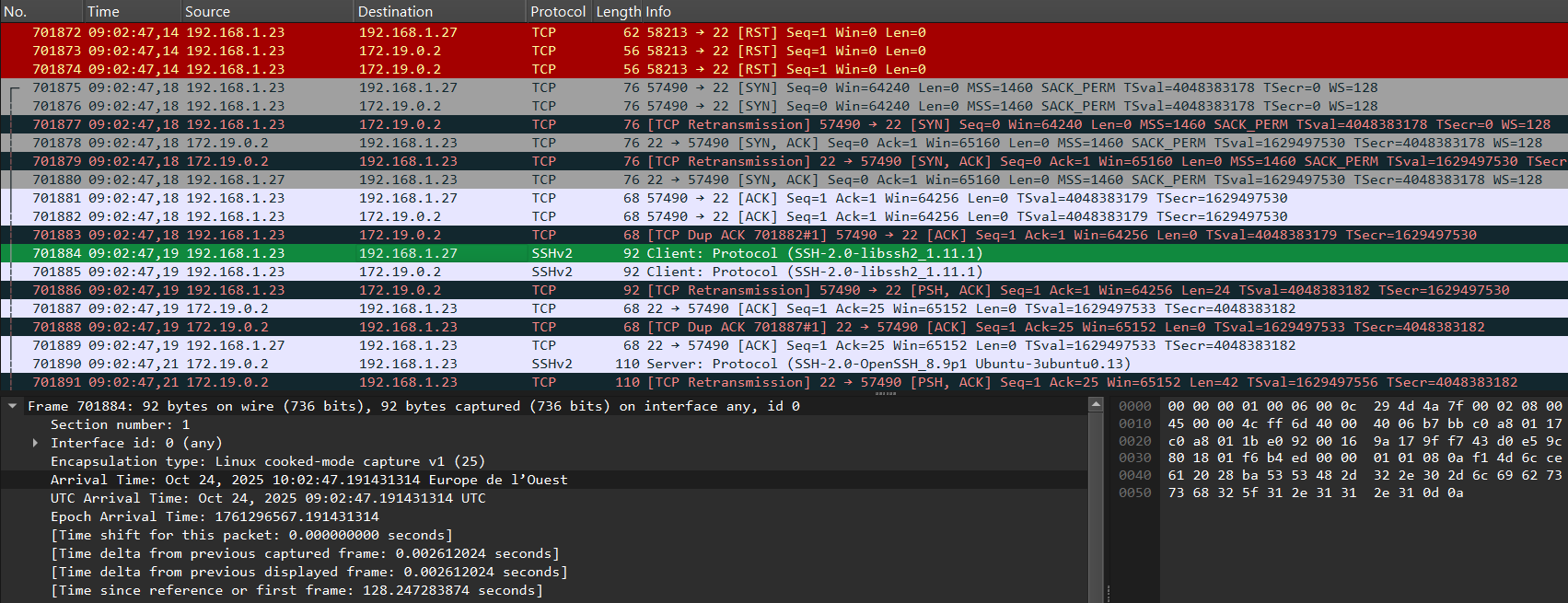
Connection Pattern:
- Multiple TCP connections from
192.168.1.23to port 22 (SSH) - TCP handshakes (SYN, SYN-ACK, ACK) followed by SSH protocol negotiation
Brute Force Indicators:
- Multiple rapid SSH connection attempts
- Same source IP (
192.168.1.23) targeting SSH service - Typical pattern of automated password guessing
First Brute Force Attempts: 09:02:47.19
Answer: 09:02:47,19
Getting the flag
After analyzing the PCAP and reconstructing the attack, the flag can be found by following these steps:
- Identify the LFI (Local File Inclusion) vulnerability exploited by the attacker using the
fileparameter in requests like/read?file=.... - In the PCAP, locate the HTTP response to the request
/read?file=/home/zoro/.ssh/authorized_keys. - The flag is typically embedded in the contents of the
authorized_keysfile or another sensitive file accessed by the attacker. - Extract the flag string from the file content shown in the HTTP response payload.
Example (hypothetical):
1
flag{lfi_and_pcap_analysis_success}
If the flag is not in authorized_keys, check other files accessed via LFI, such as /etc/passwd or any custom flag file mentioned in the challenge description.